
Introduction
Many businesses face common issues, like:
- website slow during peak traffic
- server overload and high CPU usage
- downtime during heavy user load
- application crashes unexpectedly
In most cases, the problem is not the application—it is the infrastructure design.
A single server can only handle a limited number of users. When traffic increases, the server becomes overloaded and performance drops.
That’s why modern cloud infrastructure uses load balancing to distribute traffic efficiently.
What Is Cloud Load Balancing?
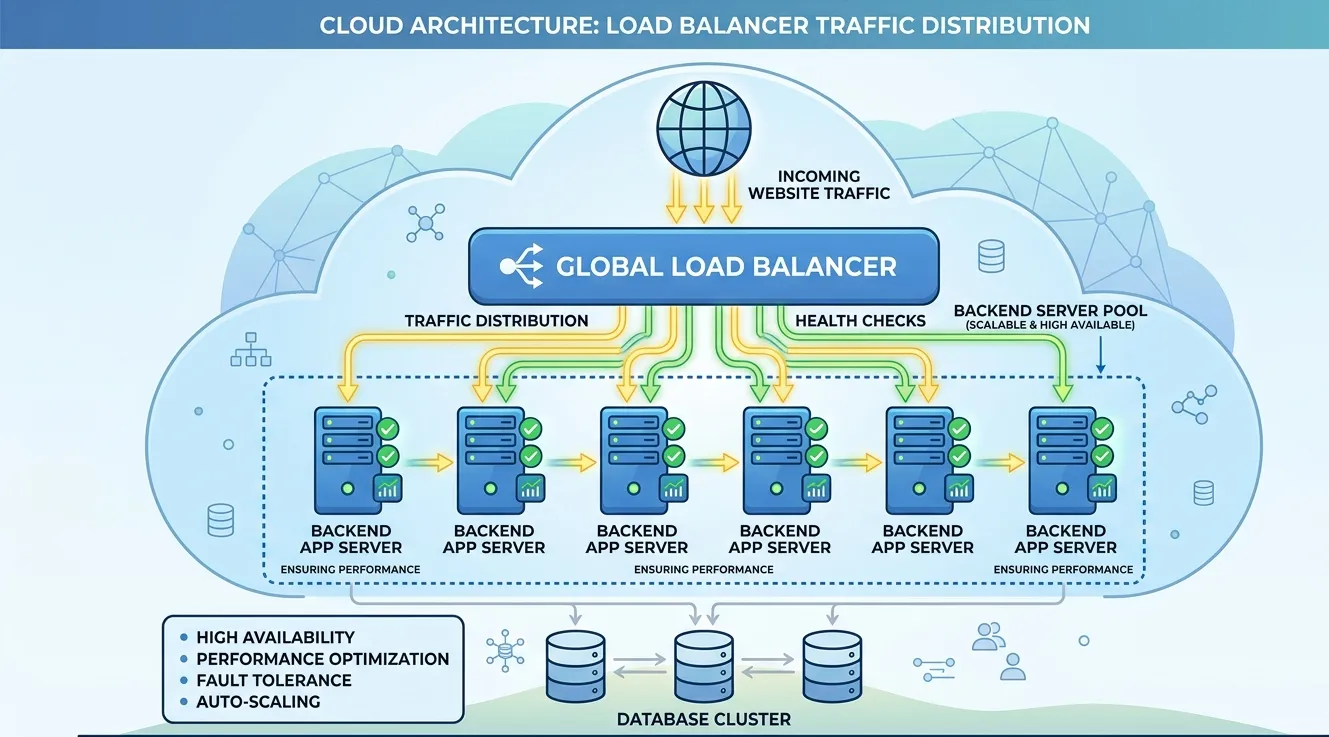
Cloud load balancing is a method of distributing incoming website or application traffic across multiple servers instead of sending all traffic to a single server.
It acts like a smart traffic controller.
Example: If you have 3 servers running the same application, the load balancer automatically sends users to the server that is least busy.
This prevents overload and improves response time.
How Cloud Load Balancing Works
A load balancer sits between users and your servers.
When a user requests your website:
- The request goes to the load balancer
- The load balancer checks available servers
- It forwards the request to the best server
- If one server is down, it redirects traffic to another server automatically
This ensures continuous service availability.
Why Businesses Need Load Balancing in Cloud
1. Improves Website Speed
When traffic is distributed, servers remain stable and respond faster.
Instead of 1 overloaded server, multiple servers share the workload.
2. Prevents Downtime
If one server fails due to CPU overload, memory crash, or maintenance, the load balancer automatically shifts traffic to healthy servers.
This ensures high uptime.
3. Supports High Traffic Scalability
Load balancing makes it easy to scale.
If traffic increases, you can add more servers, and the load balancer will automatically start distributing traffic.
4. Better Security and DDoS Protection
Many load balancers provide security features like the following:
- SSL termination
- firewall rules
- rate limiting
- DDoS protection
This helps reduce attack impact.
5. Enables Zero Downtime Deployment
Load balancing supports rolling deployments.
You can update one server at a time while others keep running. Users won’t face downtime.
Types of Load Balancing
1. Layer 4 Load Balancing (TCP/UDP)
It works at the network level and is very fast.
Used for:
- database traffic
- internal services
- gaming servers
2. Layer 7 Load Balancing (HTTP/HTTPS)
Works at application level and understands URLs, headers, and cookies.
Used for:
- websites
- APIs
- web applications
Load Balancing Methods
Round Robin
Traffic is distributed evenly across servers.
Least Connections
Traffic goes to the server with the least active connections.
IP Hash
Same user goes to same server (useful for sessions).
Weighted Load Balancing
A powerful server gets more traffic than smaller servers.
Load Balancing in AWS, Azure, and Google Cloud
AWS Load Balancing
- Application Load Balancer (ALB)
- Network Load Balancer (NLB)
- Classic Load Balancer
Azure Load Balancing
- Azure Load Balancer
- Application Gateway
Google Cloud
- Cloud Load Balancing
- HTTP(S) Load Balancer
All of these help businesses build scalable cloud applications.
Common Business Use Cases of Load Balancing
- E-commerce websites during sale offers
- Online learning portals
- Banking and finance platforms
- News portals with heavy traffic
- SaaS applications
- Mobile app backends
- ERP / CRM systems
Common Mistakes Businesses Make
Many companies try to manage traffic using a single server and only upgrade CPU/RAM. This is expensive and still not scalable.
Instead, the better approach is:
- multiple servers
- load balancing
- caching
- auto-scaling
This is more reliable and future-ready.
How Adglob Infosystem Helps with Cloud Load Balancing
At Adglob Infosystem, we help businesses implement secure and scalable load balancing solutions.
Our services include:
- AWS / Azure / GCP load balancer setup
- SSL configuration and HTTPS optimization
- auto-scaling integration
- server performance optimization
- cloud architecture planning
- monitoring and uptime management
We ensure your application remains fast, stable, and available even during heavy traffic.
Conclusion
Cloud load balancing is essential for businesses that want better performance, high uptime, and scalability. It distributes traffic across multiple servers, reduces overload, and prevents downtime.
If your website is slow or crashes during peak traffic, load balancing is the right solution to improve reliability and customer experience.
For professional cloud load balancing setup and managed cloud support, Adglob Infosystem is ready to assist.